Answer:The biggest UX/UI design trends 2026 are AI-driven UX design, calm and transparent interfaces, accessibility-first systems, generative and adaptive UI, functional micro-interactions, mobile-first UI design with spatial depth, voice and multimodal input, bento grid layouts, dark mode by default, and personalized user experience powered by behavior data.
These are not aesthetic preferences. They are responses to measurable shifts in user behavior, regulation, and AI adoption between 2025 and 2026.
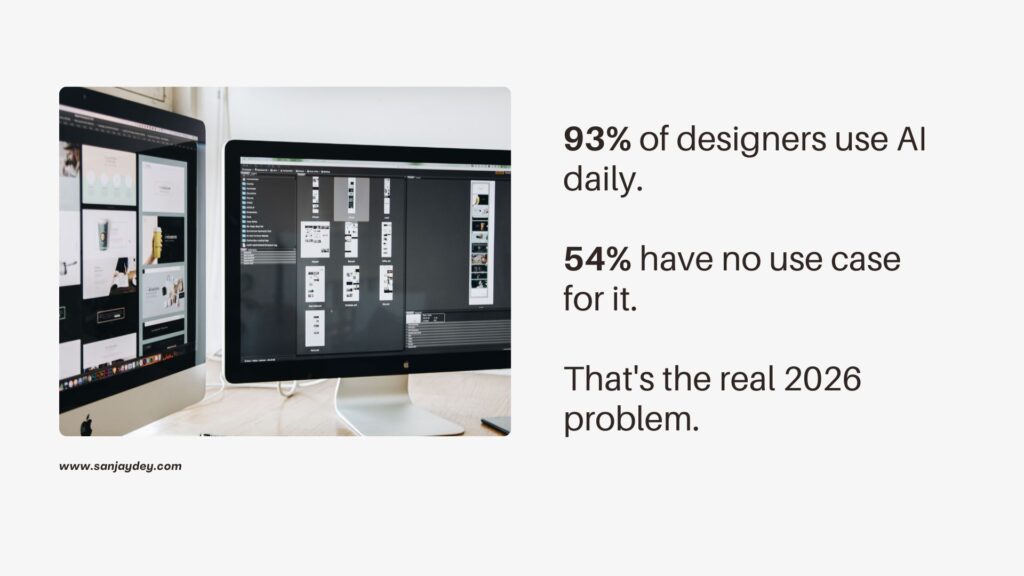
The data backs it up. 73% of designers say AI as a design collaborator will have the most impact in 2026 (Lyssna, 2026). 93% of designers already use generative AI tools daily (Lyssna, 2026). 94.8% of the top one million homepages fail WCAG accessibility checks (WebAIM Million, 2025). 71% of leading ecommerce mobile apps perform “mediocre” or worse on overall UX (Baymard Institute, 2026). And every $1 invested in UX still returns up to $100 in revenue (Forrester, 2025).
This guide breaks down the ten trends that matter, what the data says, where each trend works and where it does not, and how teams in the US, UK, UAE, Australia, and India should apply them.
Executive Summary
- AI moves from buzzword to design collaborator — 93% adoption among designers, but trust is the new bottleneck.
- Calm, transparent interfaces replace motion theatrics from 2025.
- Accessibility-first design becomes legally enforced — EAA in EU, ADA suits up 14% YoY in the US.
- Mobile UX is still broken — 71% of ecommerce apps perform mediocre or worse.
- Functional micro-interactions replace decorative ones — driven by Baymard’s checkout research.
- Generative UI and personalized user experience shift the role of designers from screen-makers to system-curators.
Table of Contents
- Why UX/UI Trends Look Different in 2026
- Trend 1 — AI-Driven UX Design Becomes the Default
- Trend 2 — Calm, Transparent Interfaces Replace Motion Theatrics
- Trend 3 — Accessibility-First Design Becomes Legally Enforced
- Trend 4 — Generative and Adaptive UI Goes Mainstream
- Trend 5 — Mobile-First UI Design With Spatial Depth
- Trend 6 — Functional Micro-Interactions, Not Decorative Ones
- Trend 7 — Voice and Multimodal Input Mature
- Trend 8 — Personalized User Experience Driven by Behavior Data
- Trend 9 — Bento Grids and Dark Mode UI Trends
- Trend 10 — Design Systems That Handle AI-Generated Content
- Geographic Relevance — USA, UK, UAE, Australia, India
- Answer Capsules
- FAQ
- Conclusion
Why UX/UI Trends Look Different in 2026
For most of 2024 and 2025, design conversations centered on motion, 3D, and visual identity. That phase is closing. The Nielsen Norman Group’s State of UX 2026 report frames it directly — trust in AI experiences is the new design problem, and human direction remains essential for shipping products that work (NN/g, 2026).
Three shifts changed the conversation.
First, AI moved from feature to infrastructure. 73% of organizations worldwide now use or pilot AI in core functions (NN/g, 2026). Designers are no longer asking if to use AI. They are asking how to make it controllable, transparent, and safe.
Second, regulation arrived. The European Accessibility Act took effect in June 2025. ADA-related lawsuits in the US hit 4,600+ in 2025, up 14% year over year (UsableNet, 2025).
Third, user tolerance dropped. Pages loading beyond 2.5 seconds see a 32% increase in bounce rate (Google Core Web Vitals, 2025). Users benchmark every product against the best experience they have ever used — not the best in your category.
Trends in 2026 reflect these forces. Below, each trend includes data, trade-offs, and a practitioner observation from working on enterprise UX programs.
Trend 1 — AI-Driven UX Design Becomes the Default
AI is no longer a feature inside the design tool. It is the design tool.
73% of designers say AI as a design collaborator will have the most impact in 2026 (Lyssna, 2026). 93% are already using ChatGPT, Midjourney, Figma AI, or similar tools in production work. Nielsen Norman Group’s research shows UX professionals use AI for 55% of routine tasks — writing, prototyping, layout drafts, and research synthesis (NN/g, 2026).
But adoption is not the story. The gap between adoption and value is.
54% of designers report their clients want to “jump on AI trends” without clear use cases (Lyssna, 2026). That is the design problem. AI in UX works when it removes cognitive load — drafting copy, suggesting variants, summarizing research. It fails when bolted on as a chatbot that none of the users asked for.
Useful directions to invest in for 2026:
- AI for research synthesis and tag clustering, not for replacing user interviews.
- AI inside design tools for variant generation, accessibility scoring, and copy testing.
- AI for personalized user experience — adjusting layout density, content order, and recommendations based on user signals.
What does not work: agentic AI features released without trust scaffolding. Users who got burned by hallucinating chatbots in 2024 and 2025 are now suspicious of every new AI feature. Building confidence requires transparency, user control, consistency, and graceful failure handling.
For deeper context, see the practitioner breakdown of AI in UX design and the productivity-focused 15 AI UX tools shaping 2026.
Trend 2 — Calm, Transparent Interfaces Replace Motion Theatrics
2025 was the year of scroll animations, parallax everything, and motion-heavy hero sections. 2026 is the correction.
Envato’s Beyond Adoption: The State of AI in Creative Work 2026 report describes the shift as a move from visual performance to systemic intelligence (Envato, 2026). The design industry calls it “calm UX.”
It comes down to attention math. Users now process more screens per day than ever — phone, laptop, TV, watch, car dashboards. Cognitive load is the scarce resource. Designers respond by reducing visual noise. Cleaner typography. Slower pacing. Fewer attention-grabbing animations.
This trend converges with another data point: 84.6% of users prefer a clean, organized layout over a cluttered one (MindInventory, 2026).
Where it works:
- SaaS dashboards where users perform repeat tasks daily.
- Healthcare and banking interfaces where errors carry cost.
- Content-heavy products where reading is the primary action.
Where it does not work: launch landing pages for new consumer products that still need emotional pull. Motion still earns attention there. The line to draw is between motion that communicates and motion that decorates.
Calm interfaces also pair with minimalist UI design and clean website trends, which is becoming the default for B2B brands across the US and UK.
Trend 3 — Accessibility-First Design Becomes Legally Enforced
For years, accessibility was a moral argument. In 2026, it is a legal one.
The numbers tell the story. 94.8% of the top one million homepages fail WCAG checks (WebAIM Million, 2025). Average errors per homepage: 50.9. The top failure categories are low-contrast text (79.1% of pages), missing alt text (55.5%), empty links, missing form labels, and missing page language.
Regulation closed the loophole. The European Accessibility Act took effect June 2025 — any digital product sold into the EU must meet WCAG 2.1 AA. ADA-related lawsuits in the US reached 4,600+ in 2025, up 14% year over year (UsableNet, 2025).
Forrester research shows accessible products see 23% higher long-term retention. Baymard Institute data documents that accessible checkout design — clear labels, visible focus states, inline validation — lifts checkout completion by up to 17% (Baymard, 2025).
The practical move for 2026 design teams:
- Audit against WCAG 2.2 (now the working standard, with WCAG 3.0 in progress).
- Build accessibility tokens into the design system — colors, focus states, type scales pre-validated.
- Test with assistive tech, not just contrast checkers. Screen readers, voice control, switch input.
- Treat accessibility as a conversion lever, not a compliance cost.
See the deeper guidance in accessibility-first design and WCAG 2.2 standards.
The teams that treat accessibility as a checkbox in Q4 lose money. The teams that build it in at design system level make every release ship faster.
Trend 4 — Generative and Adaptive UI Goes Mainstream
Adaptive design systems are the next layer above responsive design.
Where responsive design changes layout based on screen size, adaptive design changes interface based on user behavior, role, time of day, location, or task history. Generative UI takes this further — the interface composes itself at runtime from design tokens, AI-generated layouts, and user signals.
Real example: a SaaS dashboard renders a different default view for a beginner than for a power user. A travel site swaps hero content based on time of day and detected weather. An enterprise analytics tool surfaces the three charts a specific user opens most, instead of a static layout.
Searchlab data forecasts that by 2027, AI will generate 40% of UI designs at the layout level (Searchlab, 2026). 2026 is the on-ramp.
This trend has trade-offs that most coverage skips:
- Adaptive interfaces are harder to QA. Edge cases multiply.
- Personalization that goes too far creates “no two users see the same thing” problems for support and training.
- Generative layouts need rigid token systems underneath. Without design tokens, the output is chaos.
Teams that get adaptive design right invest first in design tokens — the link between design and development, and only after the token layer is solid do they introduce AI-driven variation.
Trend 5 — Mobile-First UI Design With Spatial Depth
Mobile is no longer just a screen size. It is the primary channel.
Mobile drove over 60% of global web traffic in 2025 (StatCounter, 2025). Users spend 100+ billion hours per year inside mobile apps (Statista, 2025). And yet — Baymard Institute’s 2026 Mobile App UX benchmark found 71% of leading ecommerce mobile apps perform “mediocre” or worse on overall UX. None achieved “good” or “perfect” overall performance (Baymard, 2026).
That gap is the opportunity for 2026.
The mobile UX trends earning real engagement:
- Larger, thumb-zone touch targets (minimum 44x44px iOS, 48dp Android).
- Single-thumb navigation flows for primary tasks.
- Spatial UI — layered cards, depth, and 3D previews that work without VR headsets.
- Glassmorphism returning, but functional — depth used to communicate hierarchy, not decoration.
- Bottom-anchored navigation replacing top tabs in most consumer apps.
A 1-second mobile page delay reduces conversions by up to 20% (Google, 2025). On enterprise mobile builds, I have seen page weight cuts of 40% deliver measurable lifts in completion rates without any visual changes.
For SaaS and ecommerce teams, the deeper breakdowns sit in mobile UI trends 2026 — glassmorphism and spatial computing and mobile UX mistakes that hurt user retention.
Trend 6 — Functional Micro-Interactions, Not Decorative Ones
Micro-interactions are not new. What is new in 2026 is the standard they get held to.
The 2025 version of micro-interactions was decoration — bouncing icons, hover ripples, celebration confetti. The 2026 version is functional — animations that communicate state, progress, validation, or system status.
Baymard’s checkout usability research found that unclear feedback during form validation increases error rates by 22% (Baymard, 2025). Micro-interactions that confirm field completion in real time — instead of after submission — directly reduce that friction.
Functional micro-interactions worth implementing in 2026:
- Inline form validation with real-time success/error states.
- Loading indicators that show progress, not just activity.
- Skeleton screens that match the final layout.
- Button states that confirm action without requiring a page change.
- Subtle motion that draws the eye to a state change — for example, a count badge that pulses once when it increments.
The business case: fewer support tickets, lower abandonment rates, faster task completion. Not prettier screens. The article on mobile micro-interactions that boost engagement 30% covers the implementation patterns in depth.
This is one of the most misunderstood areas of UX in 2026 — the teams that treat micro-interactions as visual polish miss the entire point.
Trend 7 — Voice and Multimodal Input Mature
Voice was the trend that overpromised in 2018 and underdelivered through 2023. In 2026 it stops being a gimmick and becomes a real input channel — alongside typing, tapping, and pointing.
Three things changed:
- LLMs now handle ambiguous natural language well enough for real product use.
- Multimodal input — voice + screen + image upload — replaces voice-only flows that always felt clunky.
- Hardware caught up. Apple’s intelligence layer, Google’s Gemini-on-device, and OEM voice stacks now run locally on phones.
Where voice and multimodal interfaces are landing for 2026:
- In-car interfaces (already 60%+ adoption in new vehicles, US/EU).
- Customer support and onboarding flows.
- Accessibility — voice as a primary input for users with motor disabilities.
- Search inside enterprise apps where typing is slow and the query is complex.
What still does not work: voice as the primary interface for a consumer product that has visual output. Voice works as augmentation, not replacement. The interaction cost of “speak the command, then verify with eyes” is still real.
Conversational interfaces work best where the alternative is a deeply nested menu structure or a complex search syntax.
Trend 8 — Personalized User Experience Driven by Behavior Data
Personalization in 2026 is no longer “show different headlines to logged-in users.” It is real-time content, layout, and journey adjustment based on behavior signals.
Salesforce’s 2025 State of the Connected Customer found 73% of customers expect companies to understand their unique needs and expectations. McKinsey research has shown personalization drives 10-15% revenue lift on average across consumer segments (McKinsey, 2025).
The personalization stack that matters in 2026:
- Behavior-based content ordering (most-used features surface first).
- Adaptive onboarding — beginners see guided flows, advanced users skip them.
- Recommendation engines that explain themselves (“Because you opened X”).
- Personalized notifications that respect attention, not interrupt it.
Trade-off — personalization fails when it slides into surveillance. GDPR in the EU, CCPA in California, and India’s DPDP Act all now require user-readable consent and the right to opt out. A personalization layer that cannot work without invasive tracking is a legal risk, not just a UX one.
The most measurable wins from personalization sit in onboarding and retention. The breakdown in SaaS onboarding — get users to the aha moment in 3 minutes shows how this plays out in product UX.
Trend 9 — Bento Grids and Dark Mode UI Trends
Two visual trends carried over from late 2025 with staying power into 2026 — bento grids and dark mode.
Bento grids — modular tile-based layouts inspired by Apple’s product pages — solve a real layout problem. They show many things at once without feeling cluttered. They work especially well for SaaS landing pages, dashboards, and feature comparison pages.
Why they stick:
- Easy to scan.
- Mobile-friendly (tiles re-stack).
- Visual hierarchy through size, not noise.
- Works with both light and dark mode.
Dark mode UI trends moved past “optional toggle” into “design first in dark mode.” Around 81.9% of users globally enable dark mode where available (Android Authority, 2025). For OLED screens, dark mode saves battery. For long sessions, it reduces eye strain.
Design implications:
- Color tokens must work in both modes.
- Contrast checks have to run twice — light AND dark.
- Iconography needs to be tested in both modes (line vs filled icons behave differently in dark).
- Brand color often needs a darker-mode variant for accessibility.
The patterns from 12 UI/UX design trends shaping 2026 (data-backed) cover how bento and dark mode combine in production layouts.
Trend 10 — Design Systems That Handle AI-Generated Content
This is the trend most teams have not started planning for yet.
If AI generates layout fragments, copy variants, and images at runtime, the design system has to be ready to absorb unpredictable content without breaking. That means:
- Components designed for variable content length (no hard-coded widths).
- Image components that handle aspect ratio variation gracefully.
- Type system that scales without overflow.
- Error states for when AI-generated content fails validation.
- Token systems that allow controlled variation without violating brand.
Atomic design principles still apply — but the assembly logic now has to assume some atoms will be generated, not just composed by humans. The piece on atomic design systems frames the foundation; what is new in 2026 is the AI-aware layer on top.
Practical move for 2026: audit your existing design system for “happy path” assumptions. Where does it break when content is twice as long? When the image is the wrong aspect ratio? When the user’s locale uses right-to-left? Those break-points are exactly where AI-generated content will expose weakness.
Geographic Relevance — How These Trends Differ by Region
United States
The US market leads on AI-driven UX adoption. 61% of US adults used AI in the past six months (Pew Research, 2025). SaaS and ecommerce brands prioritize personalization and AI features first. The ADA legal environment makes accessibility-first design non-optional — 4,600+ lawsuits in 2025 (UsableNet). Bento grids dominate B2B landing pages. Mobile-first UI design is the default for consumer apps. The biggest opportunity: enterprise dashboards that still ship desktop-only UX.
United Kingdom
The UK market leans toward calm, transparent interfaces. Fintech and banking — heavily regulated under FCA — set the tone for trust-first AI features. UK ecommerce checkout conversion sits below the US average, making Baymard-led UX optimizations a clear lever. Accessibility moved from optional to mandatory under the Public Sector Bodies Accessibility Regulations and now the broader European Accessibility Act framework. UK SaaS brands invest most in design systems and accessibility tokens.
UAE and Middle East
The UAE leads the region in digital transformation, with smart city and government digital service investment driving UX standards. Arabic-first design — right-to-left layouts, bidirectional UI — is the differentiator. Mobile-first UI design is the only viable approach (90%+ mobile internet usage). Voice and multimodal input adoption is high in Arabic-speaking markets where typing is slower. Premium consumer brands push for spatial UI and high-production motion, even as global trends move toward calm.
Australia and New Zealand
Australia adopted strict accessibility standards under the Disability Discrimination Act and the Digital Service Standard. Government UX leads the market — the gov.au design system is one of the most mature public-sector design systems globally. Mobile UX dominates ecommerce; Afterpay and similar Buy-Now-Pay-Later integrations require friction-free mobile checkout. SaaS adoption is high relative to population size, making SaaS UX a competitive battleground.
India
India’s mobile UX is leapfrog territory — over 95% of internet users access via mobile (TRAI, 2025). UPI-based payment UX is the global benchmark for friction-free transactions. Voice and multilingual support are critical — Hindi, Tamil, Bengali, and 20+ regional language UX is now table stakes for consumer apps. The DPDP Act (2023) reshapes data privacy and consent UX. SaaS designed in India for global clients increasingly leads on enterprise dashboard UX, especially in fintech, logistics, and edtech.
Answer Capsules
What is the biggest UX trend in 2026?
The biggest UX trend in 2026 is AI-driven UX design — but specifically AI as a design collaborator and transparency layer, not AI as a chatbot bolted onto every product. 73% of designers say AI will have the most impact on UX in 2026 (Lyssna, 2026), and 93% already use generative AI tools daily. The trend matters because the gap between AI adoption and AI value is wide. Teams that use AI for research synthesis, variant generation, and personalization win. Teams that ship un-trustable AI features lose user confidence and retention.
How is mobile-first UI design changing in 2026?
Mobile-first UI design in 2026 means designing for the thumb zone, single-handed use, and spatial depth on the small screen. Baymard’s 2026 benchmark shows 71% of ecommerce mobile apps perform mediocre or worse — meaning the bar is low and the opportunity is large. Key shifts include bottom-anchored navigation, larger touch targets (44px+), layered cards with subtle depth, glassmorphism used to communicate hierarchy, and aggressive page-weight optimization. A 1-second mobile load delay still cuts conversions by up to 20% (Google, 2025).
Why is accessibility in UX more important in 2026 than 2025?
Accessibility in UX matters more in 2026 because regulation arrived. The European Accessibility Act took effect in June 2025, making WCAG 2.1 AA mandatory for digital products sold into the EU. ADA-related lawsuits in the US hit 4,600+ in 2025, up 14% year over year (UsableNet). 94.8% of the top one million homepages still fail WCAG checks (WebAIM). Accessible products also see 23% higher long-term retention (Forrester) and up to 17% higher checkout completion (Baymard). Accessibility is now both a legal and business requirement.
FAQ
What are the biggest UX/UI design trends in 2026?
The biggest UX/UI design trends in 2026 are AI-driven UX design, calm and transparent interfaces, accessibility-first design, generative and adaptive UI, mobile-first UI design with spatial depth, functional micro-interactions, voice and multimodal input, personalized user experience, bento grid layouts, and design systems built to handle AI-generated content. Each trend is backed by data from Nielsen Norman Group, Baymard Institute, Forrester, and WebAIM 2025-2026 reports.
How is AI changing UX design in 2026?
AI is changing UX design in 2026 by becoming a design collaborator, not a feature. 93% of designers use generative AI tools daily (Lyssna, 2026), and 73% say AI will have the most impact on UX this year. AI now handles research synthesis, variant generation, copy testing, and accessibility scoring inside design tools. The shift is from designers drawing every screen to designers curating AI-generated options and building rules that govern personalization at runtime.
What is the best UI design trend for SaaS platforms in 2026?
For SaaS platforms, the best UI design trend in 2026 is adaptive personalized user experience built on a strong design system. SaaS users include beginners and power users in the same product, so adaptive onboarding, role-based dashboards, and AI-curated default views deliver measurable retention gains. McKinsey research shows personalization drives 10-15% revenue lift. Pair this with bento grid layouts for feature pages and functional micro-interactions inside the product itself.
What is the future of mobile app UX design?
The future of mobile app UX design is single-thumb-friendly navigation, spatial depth without VR, multimodal input (voice + tap + image), and aggressive page-weight reduction. Baymard’s 2026 benchmark shows 71% of leading ecommerce apps perform mediocre or worse — the bar is low. The teams that win design for the thumb zone, build in haptics, treat performance as a UX metric, and integrate AI assistance inside the app instead of as a separate chatbot screen.
What modern website UI trends drive higher engagement in 2026?
Modern website UI trends that drive higher engagement in 2026 include bento grids for feature pages, calm and minimalist layouts that prioritize content over decoration, dark mode UI as a first-class design target, functional micro-interactions for form validation, and AI-personalized content blocks for return visitors. Google data shows pages loading under 2.5 seconds reduce bounce rate by 32% — engagement is as much a performance question as a visual one.
What is the difference between adaptive design systems and responsive design?
Adaptive design systems vs responsive design — the key difference is what triggers change. Responsive design changes layout based on viewport size. Adaptive design systems change layout, content, and interaction based on user role, behavior, time, location, or task. Responsive is reactive to the device. Adaptive is responsive to the user. In 2026, adaptive design sits on top of responsive — you still need responsive as the foundation, then layer adaptation on top.
How do I prepare my design team for AI-driven UX in 2026?
To prepare your design team for AI-driven UX in 2026, you need to invest in three things. First, AI literacy — every designer should know prompt fluency and how to evaluate AI output critically. Second, a strict design token system — without it, AI-generated layouts will violate brand and break components. Third, a UX research practice that uses AI to scale, not replace, real user input. Nielsen Norman Group’s 2026 report stresses that human direction and verification remain essential.
What UX KPIs matter most in 2026?
The UX KPIs that matter most in 2026 are task completion rate, time-on-task, conversion rate by funnel step, accessibility compliance score (WCAG 2.2 AA), Core Web Vitals (LCP, INP, CLS), retention curves at 7-day and 30-day, and net promoter score for product experience specifically. Baymard’s research shows checkout UX fixes alone can lift conversion by 35%. Forrester continues to validate the $1-to-$100 UX ROI figure across digital products.
Conclusion
The UX/UI design trends in 2026 are not aesthetic shifts. They are responses to AI adoption hitting product surfaces, accessibility regulation moving from soft to enforced, and user tolerance for friction dropping to near zero.
The teams that win will not chase every trend. They will pick the two or three that match the real business problem — checkout abandonment, low retention, slow onboarding — and apply the relevant data-backed pattern. AI for variant generation. Functional micro-interactions for form validation. Accessibility-first tokens for compliance and conversion lift. Adaptive personalization where the audience is split between beginners and power users.
Design in 2026 is less about visual novelty and more about systemic intelligence. Make complexity understandable. Build trust into AI. Treat accessibility as a conversion lever. Test continuously.
If your product is leaking conversions, losing users in onboarding, or facing accessibility risk, book a free UX consultation to identify the highest-ROI fixes for 2026. For deeper context, see the full guide on UX design trends 2026 and the related practitioner breakdowns at sanjaydey.com.
About the Author
Sanjay Kumar Dey is a Senior UX/UI Designer and Digital Strategist with 20+ years of enterprise experience. He has designed UX programs for ArcelorMittal, Adobe, NatWest Bank UK, ITC, Adani, Indian Oil, and the Government of India (NSDC). He writes about UX, conversion rate optimization, design systems, and AI in design at sanjaydey.com, serving clients across the USA, UK, UAE, Australia, and India.
Data Sources
- Nielsen Norman Group — State of UX 2026
- Nielsen Norman Group — AI in UX articles
- Baymard Institute — Mobile App UX Benchmark 2026
- Baymard Institute — Accessibility UX research
- Lyssna — UX design trends 2026
- Envato — UX/UI Design Trends 2026
- WebAIM — WebAIM Million 2025
- Searchlab — UX & UI Statistics 2026
- MindInventory — UI/UX Statistics 2026
- McKinsey & Company — Growth Marketing and Sales
- UsableNet — ADA Web Accessibility Lawsuit Report
- Google — Core Web Vitals (web.dev)
Leave a Reply